

Last Updated on 1 April 2026 by Daniel Midlands
Table of Contents
My Experience with the TP-Link Deco X50: A Seamless Wi-Fi Upgrade
As someone who relies heavily on a stable internet connection for both work and entertainment, I’m always on the lookout for ways to improve my home network.
My old router just wasn’t cutting it, leaving me with frustrating dead zones and buffering video calls.
That’s why I decided to give the TP-Link Deco X50 mesh Wi-Fi system a try, and I must say, I’m genuinely impressed.
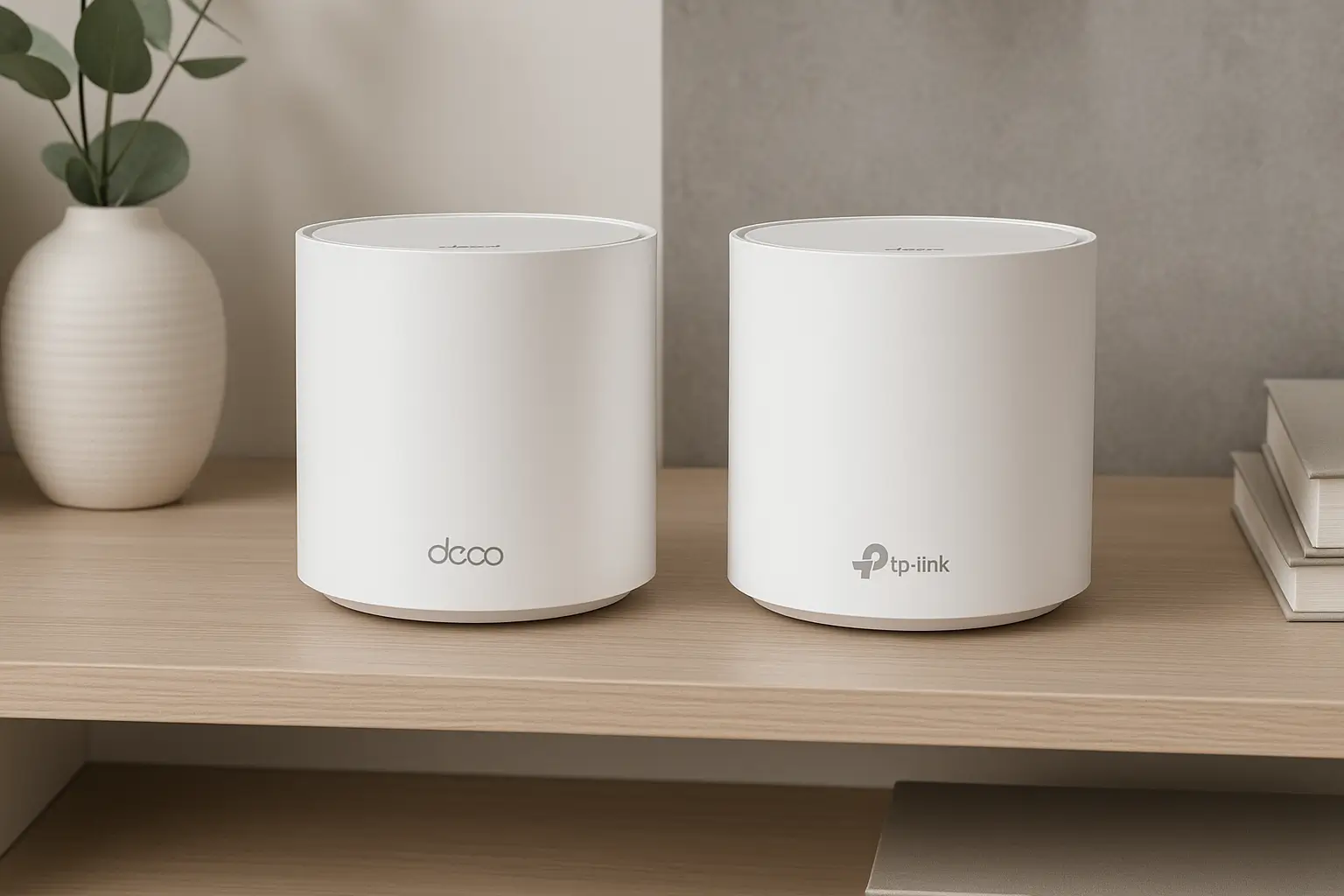
From the moment I unboxed the sleek, minimalist units, I knew this wasn’t going to be a typical router setup. The Deco X50 promised a whole-home Wi-Fi 6 experience with AI-driven mesh technology, and it certainly delivered.
The setup process itself was incredibly straightforward, guided by the intuitive Deco app.
Within minutes, I had a robust and reliable Wi-Fi network covering every corner of my home.
Amazon’s Choice | 4.5★ Rating | 7,000+ Reviews

TP-Link Deco X50(2-pack) AX3000Mbps Whole Home AI-Driven Mesh WiFi 6 System, Dual-Band WiFi Booster with 3x Gigabit Ports, Coverage up to 4,500 ft2, Connect up to 150 devices, HomeShield Security
- Superior Wireless Speed – Combines wireless speeds up to 2402Mbps over 5 GHz, and 574 Mbps over 2.4 GHz, Per Deco Unit has 3× Gigabit Ports
- AI-Driven Mesh: Intelligently learns the network environment to provide ideal Wi-Fi unique to your home,4 Streams, Less Lag – 2×2/HE160 2402 Mbps + 2×2 574 Mbps
- Boosted Seamless Coverage: Achieve seamless whole home coverage with a clearer and stronger whole home Wi-Fi signal generated by Wi-Fi 6, Coverage up to 4,500 ft2, and Connect over 150 devices without dragging down performance
- TP-Link HomeShield: Keeps your home network safe with cutting-edge features for network and IoT protection, easy setup
- Setup Made Easier Than Ever – The Deco app walks you through the setup step-by-step, with 3 years manufactory warranty
New starting from: 159.99 £
Buy on AmazonQuick Specs: What’s Under the Bonnet?
Before diving into my full review, here’s a quick look at the core specifications of the TP-Link Deco X50:
| Feature | Specification |
| Wi-Fi Standard | Wi-Fi 6 (802.11ax) |
| Wi-Fi Speed | AX3000 (2402 Mbps on 5 GHz, 574 Mbps on 2.4 GHz) |
| Coverage | Up to 6,500 sq. ft. (3-pack) |
| Connectivity | 2 x Gigabit ports per unit |
| Security | TP-Link HomeShield |
| Special Features | AI-Driven Mesh, OFDMA, MU-MIMO, WPA3 |
Pros and Cons: My Honest Assessment
Every product has its strengths and weaknesses, and the Deco X50 is no exception. Here’s what I found during my usage:
| Pros | Cons |
| ✅ Excellent whole-home coverage | ❌ No USB port for network storage |
| ✅ Easy and quick setup via Deco app | ❌ Advanced settings require the app |
| ✅ Reliable Wi-Fi 6 performance | ❌ Price point might be higher than traditional routers |
| ✅ Sleek, discreet design | |
| ✅ Robust security with HomeShield | |
| ✅ AI-driven mesh optimises connections | |
| ✅ Good for multiple devices and 4K streaming |
My Take: Why I Like the Deco X50
What truly sets the Deco X50 apart for me is its ability to provide consistent, high-speed internet throughout my entire home. I no longer experience those frustrating dead zones in my bedroom or garden office.
Streaming 4K content, online gaming, and video calls are all handled with ease, even with multiple devices connected simultaneously.
The AI-driven mesh technology is a real game-changer. I’ve noticed how intelligently it optimises connections, ensuring my devices always connect to the strongest signal.
Plus, the HomeShield security suite offers valuable peace of mind, protecting all my connected gadgets from potential threats. It’s a comprehensive solution for modern home networking.
Setting Up the Deco X50: A Breeze
One of my biggest concerns with new tech is often the setup process, but the Deco X50 truly impressed me here. The Deco app is incredibly user-friendly, guiding you step-by-step.
I simply plugged in the main unit, downloaded the app, and followed the on-screen instructions.
Adding the satellite units was just as simple – plug them in, and the app does the rest.
It’s genuinely a plug-and-play experience, perfect for anyone who isn’t a networking expert.

Performance: Fast and Flawless
The Wi-Fi 6 standard really shines with the Deco X50. I’ve seen a noticeable improvement in speeds, especially on my newer devices. Large file downloads are quicker, and there’s virtually no lag when I’m online gaming.
Even during peak usage times, with family members streaming, browsing, and gaming, the network holds up exceptionally well. It’s a far cry from the sporadic performance I used to get.
Design and Aesthetics: Blending In
I appreciate the subtle design of the Deco X50 units.
They’re cylindrical and white, easily blending into any home decor without standing out like traditional bulky routers.
I’ve placed them strategically around my home, and they look quite smart and discreet.
This is a huge bonus for me, as I prefer my tech to be functional yet unobtrusive.
Not sure if the X50 is overkill for your home? If you have standard broadband under 500 Mbps and a 3–4 bed house, the more affordable Deco X10 AX1500 might be all you need. Read our full Deco X10 review to compare.
Expert Verdict: A Smart Choice for Whole-Home Wi-Fi
The TP-Link Deco X50 AX3000 mesh Wi-Fi system is an excellent choice for anyone looking to upgrade their home network, especially those struggling with dead zones or slow speeds.
It offers a fantastic blend of performance, ease of use, and robust security features.
While it might be a slightly larger investment than a single router, the whole-home coverage and seamless experience it provides make it truly worthwhile.
While the Deco X50 offers fantastic Wi-Fi 6 performance for most homes, power users or small businesses might crave even more advanced features or cutting-edge Wi-Fi technology. For an in-depth look at a truly next-generation access point, you can explore my Ubiquiti U7 Pro Review, which highlights its Wi-Fi 7 capabilities and enterprise-grade performance.
Amazon’s Choice | 4.5★ Rating | 7,000+ Reviews

TP-Link Deco X50(3-pack) AX3000Mbps Mesh WiFi 6 System, AI-Driven, Coverage up to 6500ft², Seamless Roaming WiFi Mesh System, Gaming & 4K, Easy Setup, Alexa & Google Home, TP-Link HomeShield
- Superior Wireless Speed – Combines wireless speeds up to 2402Mbps over 5 GHz, and 574 Mbps over 2.4 GHz, Per Deco Unit has 3× Gigabit Ports
- AI-Driven Mesh: Intelligently learns the network environment to provide ideal Wi-Fi unique to your home
- Boosted Seamless Coverage: Achieve seamless whole home coverage with a clearer and stronger whole home Wi-Fi signal generated by Wi-Fi 6, Coverage up to 6,500 ft2
- TP-Link HomeShield: Keeps your home network safe with cutting-edge features for network and IoT protection, easy setup
- Connect More Devices: Connect over 150 devices without dragging down performance, 3 years manufactory warranty
New starting from: 199.99 £
Buy on Amazon- Trusted Source: For more details on Wi-Fi 6 technology, check out Wikipedia’s Wi-Fi 6 page.
- Helpful Tool: If you want to test your current internet speed, try Speedtest.net.
If you’re looking to bolster your home network security beyond just Wi-Fi, you might also consider smart home devices. For those interested in surveillance, I’ve previously delved into the capabilities of the Tapo security camera in my Tapo TD21 Review, which could complement your Deco X50 setup by adding an extra layer of peace of mind.
You asked, we answered
What is the TP-Link Deco X50 AX3000?
The TP-Link Deco X50 AX3000 is a mesh Wi-Fi system designed to provide fast, reliable, and seamless Wi-Fi 6 coverage throughout your entire home. It uses multiple units that work together to eliminate dead zones.
How does the Deco X50 improve Wi-Fi coverage?
The Deco X50 creates a unified network that intelligently connects your devices to the strongest signal. This AI-driven mesh Wi-Fi system ensures you get consistent speeds and coverage, even in larger homes or properties with thick walls.
Is the TP-Link Deco X50 easy to set up?
Yes, setting up the TP-Link Deco X50 is incredibly straightforward. You simply download the intuitive Deco app to your smartphone, plug in the units, and follow the step-by-step instructions. The app guides you through the entire process.
What are the main features of the TP-Link Deco X50?
Key features of the TP-Link Deco X50 Wi-Fi 6 system include AX3000 dual-band speeds, whole-home coverage, AI-driven mesh technology for optimal connections, robust security with HomeShield, and easy management via the Deco app.
Does the Deco X50 support Wi-Fi 6?
Yes, the TP-Link Deco X50 fully supports the latest Wi-Fi 6 (802.11ax) standard, offering faster speeds, lower latency, and improved capacity for multiple connected devices compared to older Wi-Fi standards.
Is the TP-Link Deco X50 good for gaming and 4K streaming?
Absolutely. Thanks to its Wi-Fi 6 performance and mesh network capabilities, the Deco X50 is excellent for demanding activities like 4K video streaming and online gaming, providing stable and high-speed connections across your home.
What is TP-Link HomeShield?
TP-Link HomeShield is a comprehensive security suite included with the Deco X50. It provides real-time IoT protection, robust parental controls, and quality of service (QoS) to help manage and secure your home network.
How many units do I need for my home?
The number of Deco X50 units you need depends on the size and layout of your home. A 1-pack is suitable for smaller flats, a 2-pack for medium-sized homes, and a 3-pack typically covers larger properties up to 6,500 sq. ft.
Can I expand my Deco X50 system later?
Yes, TP-Link Deco X50 systems are expandable. You can easily add more Deco units to your existing network to further extend coverage as your needs change. All Deco models are compatible with each other.
No responses yet