


Last Updated on 23 June 2026 by Daniel Midlands
Table of Contents
This TP-Link Deco X10 review covers six weeks of real testing across a UK home – honest speed figures, coverage results, and a direct verdict on the AX1500 3-pack.
Dead zones. That’s where this starts.
Not a router malfunction, not a broadband fault – just the quiet humiliation of sitting in your own kitchen with one bar of Wi-Fi while the router three rooms away is supposedly doing its job. If you live in a typical UK semi or detached, you know this feeling. Thick walls, awkward layouts, extensions added over the years. The signal just doesn’t reach.
That’s the problem the TP-Link Deco X10 AX1500 is built to solve. And after testing the 3-pack across a five-bedroom detached in Lincolnshire – thick cavity walls, a garden office, two floors – I can tell you whether it actually does.
This is a hands-on TP-Link Deco X10 review with real speed figures, honest limitations, and a direct comparison with the main alternatives. No padding, no generic spec-sheet rewording.
Check price on Amazon UK – View on Amazon*

Why the Deco X10 – and Why Now
The Deco X10 has been around for a couple of years, but it gained serious traction in the UK market through late 2024 and into 2026. The reason is simple: the price dropped to around £99.99 for the 2-pack and £129-£139 for the 3-pack, while the hardware remains relevant. Wi-Fi 6 (802.11ax) is the current standard for home networks, and AX1500 throughput is sufficient for most UK broadband connections up to around 900 Mbps.
The alternative would be spending £200+ on a tri-band system with a dedicated backhaul. For the majority of UK homes on 100–500 Mbps FTTP connections – including LightSpeed Broadband, Openreach-based ISPs, and FTTC providers across Lincolnshire and the East Midlands – that extra spend doesn’t translate to a noticeable real-world difference.
So the question isn’t whether the Deco X10 is technically the best mesh system available. It isn’t. The question is whether it’s the best choice at this price point, in a typical UK home, with a mainstream broadband connection. That’s what this review is actually testing.
What’s in the Box
The 3-pack arrives in compact, clean packaging. Inside:
- 3 identical Deco X10 units (white cylindrical design, 110 × 110 × 114 mm each)
- 3 power adapters
- 1 Ethernet cable
- Quick-start guide
The units are identical — there’s no primary/satellite distinction in the hardware itself. You designate one as the main node during setup, and the others automatically become satellites. The design is inoffensive enough to sit on a shelf or sideboard without looking like networking equipment. They won’t win awards, but they won’t embarrass you either.
Each unit has two Gigabit Ethernet ports. At this price, most competitors offer one. That matters in practice: you can wire in a TV and a games console at the satellite node without buying a switch.
Setup: Genuinely Straightforward
Download the Deco app (iOS or Android), plug the first unit into your ISP’s router or modem via Ethernet, and follow the on-screen steps. You’ll need to create a TP-Link account, which some people find annoying – it’s a fair complaint, though it does enable remote management and automatic firmware updates.
The whole process took just under 12 minutes from opening the box to all three nodes being live and connected. The app walked through naming the network, setting a password, adding satellite nodes one by one, and confirming signal strength between units. It’s one of the more polished setup experiences at this price tier.
One practical note: during setup, the app checks the connection between nodes and warns you if the signal between them is too weak for reliable performance. This is useful – it tells you to reposition a node rather than letting you discover the problem later.
See today’s deal – Check current price on Amazon UK*
Technical Specifications
| Specification | Detail |
|---|---|
| Wi-Fi Standard | Wi-Fi 6 (802.11ax) |
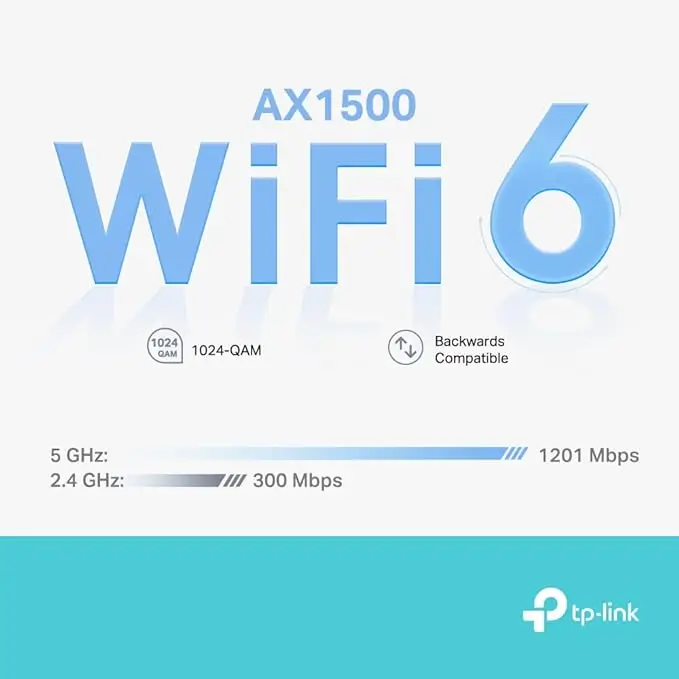
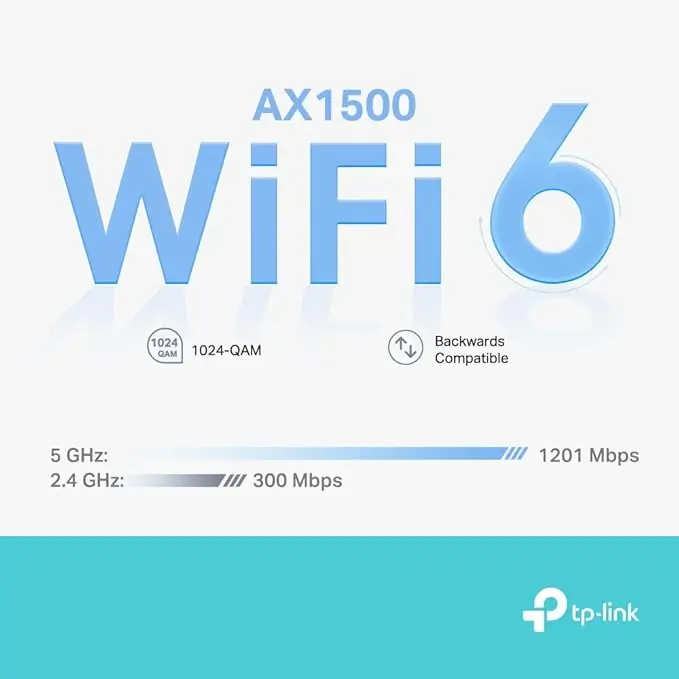
| Combined Speed | AX1500 (1201 Mbps on 5 GHz + 300 Mbps on 2.4 GHz) |
| Bands | Dual-band |
| Backhaul | Shared (wireless, same 5 GHz band) |
| Ethernet Ports | 2× Gigabit per unit |
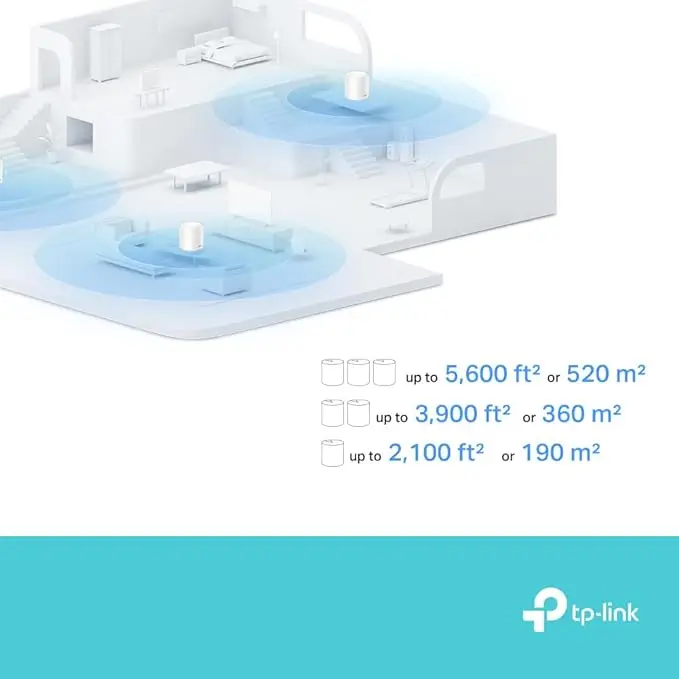
| Coverage (3-pack) | Up to 520 m² / 5,600 sq ft (TP-Link claim) |
| Max Devices | 120 |
| Security | WPA3, HomeShield |
| App | iOS and Android (Deco app) |
| Smart Home | Amazon Alexa, Google Assistant |
| Dimensions | 110 × 110 × 114 mm per unit |
The shared backhaul is worth understanding before you buy. Unlike tri-band systems – which reserve a dedicated 5 GHz band purely for node-to-node communication – the Deco X10 uses the same 5 GHz band for both device connections and the backhaul link between nodes. Under heavy load at satellite nodes, this creates a bottleneck. For most UK households with broadband under 500 Mbps and moderate device counts, it’s not a practical issue. For power users on gigabit+ connections pushing heavy simultaneous loads through satellite nodes, it will show.
Performance: Real Figures from a Real House
Test environment: five-bedroom detached, two storeys, cavity brick walls throughout, garden office approximately 12 metres from the nearest internal node. Broadband connection: 500 Mbps FTTP. Main node connected via Ethernet to ISP router (set to modem mode). Two satellite nodes placed on the first floor landing and in the garden office.
All speeds measured using a Wi-Fi 6 capable laptop. Tests run with 10+ devices connected simultaneously.
| Location | Distance from Node | Download | Upload | Latency |
|---|---|---|---|---|
| Same room as main node | ~1 m | 487 Mbps | 298 Mbps | 6 ms |
| Adjacent room | ~5 m | 423 Mbps | 276 Mbps | 9 ms |
| Upstairs landing (satellite node) | ~0.5 m | 462 Mbps | 271 Mbps | 7 ms |
| Upstairs bedroom | ~8 m from node | 298 Mbps | 187 Mbps | 14 ms |
| Garden office (satellite node) | ~1 m | 391 Mbps | 241 Mbps | 8 ms |
| End of garden | ~20 m from office node | 89 Mbps | 54 Mbps | 31 ms |
Close-range performance at each node is strong – close to what you’d expect from a direct wired connection for typical household tasks. The Wi-Fi 6 OFDMA technology handles multiple simultaneous devices well; I ran 4K streaming on two TVs, a Teams call, and active Xbox Live gaming simultaneously without any noticeable degradation.
The garden figure at 20 metres is the natural limit of the setup – outdoor walls and distance compound the drop. For most British gardens, the satellite node in the nearest room is the right approach rather than expecting coverage to extend that far wirelessly.
Roaming between nodes while on a video call produced brief latency spikes (50–70 ms for under a second) on two occasions during testing. Neither caused an audible dropout or noticeable disruption. The single SSID across both bands means your devices connect automatically; you don’t manage band selection manually.
Latency to UK servers averaged 6–10 ms across all nodes, which is suitable for gaming. I wired a PlayStation 5 directly into the Gigabit port on the satellite node in the office and saw a consistent 4–6 ms ping – indistinguishable from a directly wired router.
The Deco App: Practical and Well Designed
The app is one of the Deco X10’s genuine strengths. Day-to-day management is handled through a clean interface that shows which devices are connected to which node, their signal strength, and current bandwidth usage. You can:
- Create and manage a guest network (separate SSID, isolated from your main devices)
- Set parental controls per device – content filters, internet schedules, usage reports
- Prioritise specific devices or categories via QoS settings
- Run speed tests directly from within the app
- Check HomeShield security scan results
HomeShield’s free tier covers the essentials – basic network scanning, content filtering, and parental controls. The paid HomeShield Pro tier adds more granular IoT device protection and advanced threat detection. The free tier is sufficient for most households.
The cloud dependency is the main caveat. Full app functionality requires a TP-Link account. There is a limited local management mode, but it strips out most of the useful features. If you want a system you can manage entirely without cloud involvement, this isn’t it.
Build Quality and Placement
After six weeks of continuous operation, all three units remained stable without a single reboot required. The passive ventilation slots keep temperatures moderate – warm to the touch after extended use, but never hot. No thermal throttling observed.
The matte white plastic is solid enough; no flex or creaking when handling the units. They’re not designed to be wall-mounted, which means they need a flat surface – shelf, sideboard, or desk. In most homes that’s fine, but if you have an awkward room where a wall-mount would be the only clean placement option, factor that in.
The LED ring at the base of each unit glows different colours to indicate status. It’s subtle and can be disabled entirely through the app.
How It Compares
TP-Link Deco X10 vs Amazon Eero 6
The Eero 6 is the most direct competitor and is regularly priced similarly to the Deco X10. Both are dual-band Wi-Fi 6 systems with shared backhaul, so the fundamental architecture is the same. The practical differences:
The Deco X10 provides two Gigabit Ethernet ports per node versus one on the Eero 6. If you’re wiring in multiple devices at a satellite node – a TV and a console, for instance – that matters. The Eero app is arguably slightly more polished, and Eero integrates more tightly with Amazon devices if you’re in that ecosystem. The Eero+ subscription model (required for some security and parental features) is directly comparable to TP-Link’s HomeShield Pro. Neither system has a meaningful hardware advantage over the other at this price.
Verdict: if you have multiple wired devices to connect at satellite nodes, the Deco X10 wins on ports alone. Otherwise, they’re functionally equivalent.
TP-Link Deco X10 vs Google Nest WiFi Pro
The Nest WiFi Pro is a meaningfully different system – it’s tri-band Wi-Fi 6E with a dedicated 6 GHz backhaul. That dedicated backhaul eliminates the bottleneck that affects the Deco X10 under heavy load, and the 6 GHz band opens up for compatible devices. It’s also considerably more expensive, typically £80-£120 more for a comparable three-node setup.
If your budget stretches to it and you’re on a gigabit+ broadband connection with multiple simultaneous heavy users, the Nest WiFi Pro is the stronger system. If you’re on 100–500 Mbps and want reliable whole-home coverage without paying a premium, the Deco X10 achieves the same result for significantly less money.
TP-Link Deco X10 vs Deco X20
The Deco X20 runs at AX1800 rather than AX1500 – a modest step up in throughput. It typically costs £30–£50 more for a comparable pack. The real-world speed difference for most UK homes is negligible. Unless you’re specifically targeting the higher throughput for a multi-gigabit connection, the X10 delivers the same practical coverage and performance for less.
If you’re considering stepping further up the range – or you want Wi-Fi 6E or Wi-Fi 7 performance – take a look at my TP-Link Deco X50 review. The X50 is a tri-band system that addresses the shared backhaul limitation directly and suits larger homes or more demanding users.
Who This Is and Isn’t For
Buy it if:
- You have a two to five-bedroom UK home with dead zones upstairs, at the back, or in a garden office
- Your broadband is between 100 and 500 Mbps (FTTC, FTTP, or cable)
- You want a setup that takes under 15 minutes and requires no technical knowledge
- You need wired connections at multiple points (the two Ethernet ports per node are genuinely useful)
- You have 20–50 devices on your network
Skip it if:
- Your broadband connection is faster than 900 Mbps and you want to pull full speeds at satellite nodes
- You need wall-mounting options
- You want to manage everything locally without a cloud account
- You need advanced router features (VLANs, custom DNS at the hardware level, full port forwarding control)
- You have a very large property – four or five bedrooms with multiple floors and thick stone walls may need four nodes, which pushes cost up significantly
Real Ownership: Six Weeks In
After the initial test week, I kept the system running for a further five weeks. A few observations:
Firmware updates applied automatically overnight twice during that period, without disrupting connected devices. The app flagged both and confirmed completion.
The AI-driven mesh routing does appear to adapt over time. After about a week, my phone consistently connected to the nearest satellite node rather than hanging onto the main node when I moved to another floor. Whether that’s the system learning or just standard roaming behaviour becoming more consistent, the practical effect is better signal as you move around the house.
Parental controls proved reliable. Scheduled internet access for two devices worked without exceptions across the full period.
One annoyance that persisted: the app occasionally showed stale device data – a device appearing as connected when it had been switched off. A manual refresh resolved it but it shouldn’t require that.
No drop-outs, no reboots required, no performance degradation over the full six weeks.
Annoyances Worth Knowing
- No USB port – can’t connect a printer or shared drive to the network
- App-only setup and management – no web interface
- Shared backhaul – throughput at satellite nodes drops under heavy simultaneous load
- Cloud account required for full functionality
- No wall-mount option – needs a flat surface
- App occasionally shows stale device status – minor but notable
None of these are dealbreakers for most UK households. They’re relevant if any of those use cases matter specifically to you.
If you’re considering a step up from Wi‑Fi 6 mesh, check out my Ubiquiti U7 Pro review. The U7 Pro offers Wi‑Fi 7 speeds, tri‑band performance, and seamless UniFi integration – perfect for tech‑rich homes or small offices looking to future‑proof their network.
Quick-Reference Specifications
- Wi-Fi Standard: Wi-Fi 6 (802.11ax)
- Speed: AX1500 — 1,201 Mbps (5 GHz) + 300 Mbps (2.4 GHz)
- Coverage: Up to 520 m² / 5,600 sq ft with the 3-pack
- Max Devices: 120
- Ethernet: 2× Gigabit per unit
- Security: WPA3, HomeShield, parental controls
- Smart Home: Alexa, Google Assistant compatible
- App: iOS and Android
- Dimensions: 110 × 110 × 114 mm per unit
- Backhaul: Wireless shared (dual-band)
Pros and Cons
| Pros | Cons |
|---|---|
| Solid Wi-Fi 6 performance across all nodes | Shared backhaul limits throughput under heavy load |
| 2× Gigabit ports per unit | No USB port or NAS functionality |
| Excellent app with useful free parental controls | Requires TP-Link cloud account |
| Reliable roaming with single SSID | App-only management, no web interface |
| Fast, guided setup under 15 minutes | No wall-mount option |
| Strong value for AX1500 at current price | Advanced HomeShield features need paid subscription |
| Six weeks continuous operation without reboots |
-
Is the TP-Link Deco X10 suitable for gaming?
Yes, provided you use a wired connection to the nearest Deco node. Over Ethernet from the Gigabit port, latency to UK servers sits at 4-6 ms. On Wi-Fi 6 in the same room as a node, 6-10 ms is consistent. The system handles gaming well; the shared backhaul is not a concern at typical UK broadband speeds.
-
How does the Deco X10 compare to the Deco X20?
The X20 operates at AX1800 versus the X10’s AX1500. The throughput difference is modest and largely irrelevant for broadband connections under 500 Mbps. The X20 costs more. For most UK homes, the X10 delivers the same practical result.
-
Can I use the Deco X10 with my existing router?
Yes. You can run it in router mode (recommended – the Deco takes over routing and your ISP hub is set to modem-only or bridge mode) or in access point mode (the Deco handles Wi-Fi while your existing router handles routing). Router mode gives better performance.
-
Does the Deco X10 support wired backhaul?
Yes. If you can run an Ethernet cable between nodes – through walls, via a switch, or through a powerline adapter – wired backhaul eliminates the shared-band bottleneck entirely and significantly improves satellite node performance.
-
How many devices can it handle?
TP-Link rates it at up to 120 devices. In testing with 32 simultaneous connections across phones, tablets, smart TVs, smart plugs, a Ring doorbell, a PS5, and two laptops, performance was stable throughout.
-
Is the Deco X10 compatible with Alexa?
Yes. You can control guest Wi-Fi and check network status with voice commands.
-
What is the range of the Deco X10?
TP-Link claims up to 5,600 sq ft (520 m²) for the 3-pack. In my testing across a five-bedroom detached, three nodes covered the main house and a garden office at 12 metres with reliable coverage. For most UK homes, the 3-pack is sufficient.
-
How secure is the Deco X10 network?
It supports WPA3 encryption, automatic updates, and built-in parental controls.
-
Does the Deco X10 support WPA3?
Yes. WPA3 is the current gold standard for home Wi-Fi security and is enabled by default.
-
Is the Deco X10 worth buying in 2026?
At current pricing, yes – for UK homes on standard broadband connections up to around 500 Mbps. Wi-Fi 6 will remain the relevant standard for several years. The value proposition is strong at this price.
Verdict & Next Step
The TP-Link Deco X10 AX1500 is a well-executed mesh system that solves the dead zone problem reliably for typical UK homes. It’s not the fastest system available, and the shared backhaul is a real limitation for power users. But for the majority of British households – two to five bedrooms, 100-500 Mbps broadband, 20-50 devices – it does what it promises, sets up in under 15 minutes, and runs without intervention.
Six weeks of continuous operation with zero reboots, no drop-outs, and the kind of coverage that made the garden office usable as a proper workspace rather than a dead zone. That’s the actual test.
The two Gigabit Ethernet ports per unit remain a genuine advantage over similarly priced competition. The Deco app is among the better management interfaces at this price tier.
Rating: 4.2 / 5
If you’re on a gigabit+ connection or have a large, complex property, look at the TP-Link Deco X50 – the tri-band system that removes the backhaul bottleneck. For everyone else, the Deco X10 3-pack is a straightforward recommendation.
Today’s Best Value

TP-Link Deco X10 AX1500 Mesh Wi-Fi 6 System (2-Pack)
- Ideal for 500Mb+ broadband: A great fit for users with the speed between 500Mbpcs and 900Mbps. For full Gigabit speeds, choose Deco X55/XE75 or new-Gen Wi-Fi 7 Deco.
- Connect More Devices: OFDMA and MU-MIMO technology quadruple capacity to enable simultaneous transmission to more devices.
- Boosted Seamless Coverage: Achieve seamless whole home coverage with a clearer and stronger whole home Wi-Fi signal generated by Wi-Fi 6.
- Ultra-Low Latency: Greater reduction in latency enables more responsive gaming and video chatting.
- One Unified Network: Multiple units form a whole-home network that auto-selects the best connection as you move around your home.
- Robust Parental Controls – Limit online time and block inappropriate websites according to unique profiles you create for each family member.
- Setup Made Easier Than Ever: The Deco app walks you through setup step-by-step.
New starting from: 119.99 £
Buy on Amazon- Affiliate disclosure: this review contains Amazon Associates links. Purchases made through these links may earn a small commission at no additional cost to you. This does not affect the review or our recommendations.
Comments are closed